Brand Voice
Replies that sound like your hotel, not a robot.
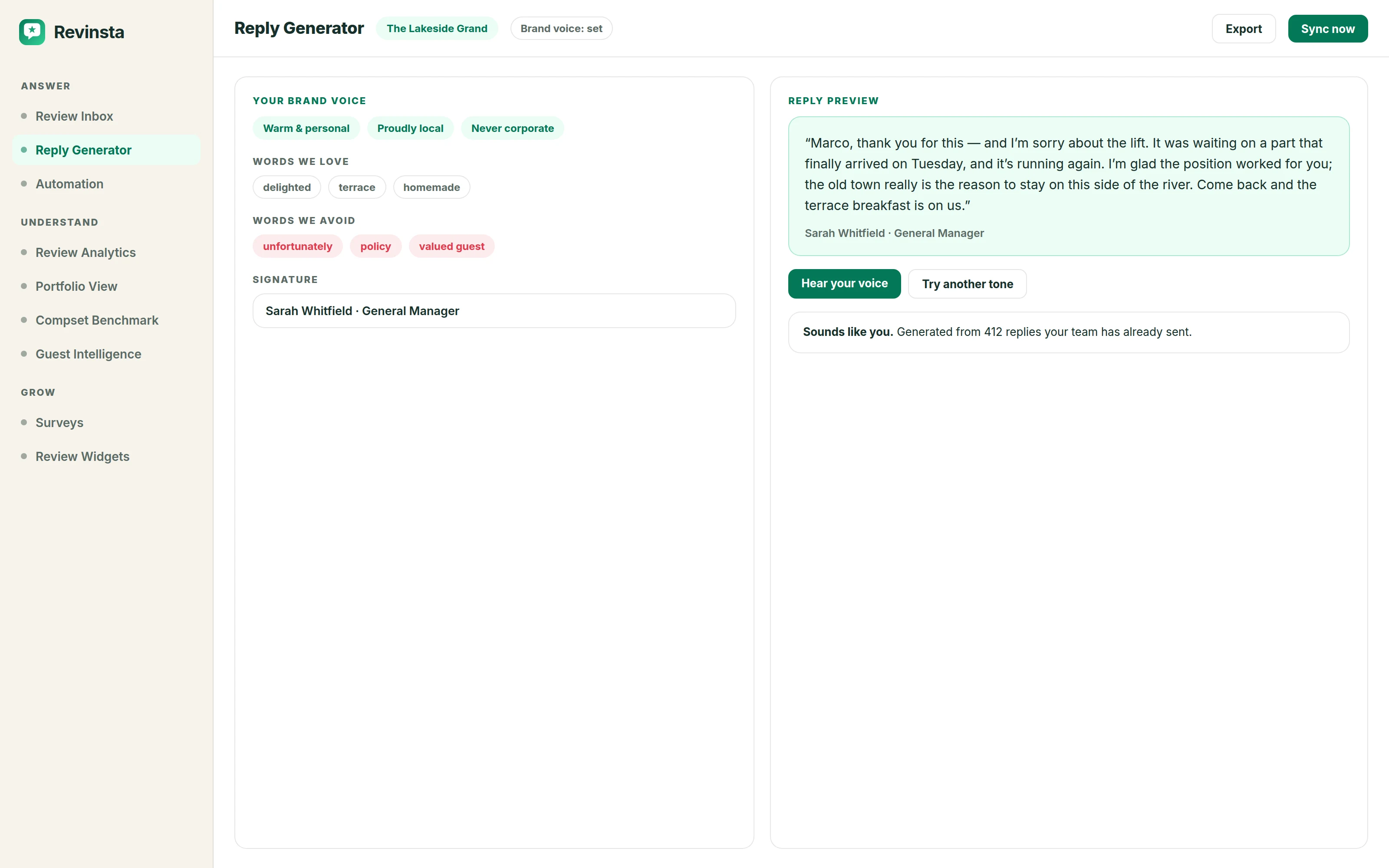
Your brand voice is how your property speaks to guests. Revinsta captures it once - your tone, a personal signature, a few words about what makes you you - and applies it to every AI-drafted reply, so responses feel personal and never templated, no matter who on your team hits send.
- 7-day free trial
- No credit card
- Set up in about 10 minutes
"Dear Valued Guest, thank you for your feedback. We strive to provide excellent service." Travellers have read a thousand of those. A reply like that does your hotel no favours at all - it tells the next reader nobody was really listening.
Any AI can write fluent English. What matters is whether it sounds like your property: the words your front desk actually uses, the ones you would never put your name to, and the fact that your rooftop bar is the reason people come back.
You set that once. Choose a tone or describe your own, add the vocabulary you like and the phrases you avoid, then read a real reply before you save anything. If it doesn't sound like your hotel you will know in thirty seconds, and you can change it.
How it works
Brand Voice, step by step.
- 1
Choose a tone, or describe your own
Casual, formal, business casual - or write the personality out yourself: warm and familiar, quietly formal, proudly local. Three words is usually enough for the difference to be obvious in the output.
- 2
Add your vocabulary and your signature
The words you love, the words you avoid, and a sign-off. The signature adapts into each review's language automatically, so a German guest gets a German reply signed the way your team signs off, not a translated block of English.
- 3
Hear it before you commit
Generate a sample against a real review and read it. Nothing is saved until you are happy. Once set, the voice applies to every AI-drafted reply across the property, no matter who on your team hits send.
What you get
Included at every property count.
- Pick a tone (Casual, Formal, Business Casual) or describe your own personality in your words
- Add a signature the AI adapts into each review's language automatically
- Set reply-language rules: mirror the review's language, or reply in a fixed one
- Smart snippets teach it how to handle recurring topics, worded differently every time
- Learns from your past replies and stays consistent across every property and teammate
- Defined per property during onboarding, fine-tuned any time in Settings
Questions
About brand voice.
That is the thing we have worked hardest on, and the honest answer is that it depends entirely on the setup. A reply generated from a blank profile reads generic. One generated from a filled-in brand voice, with your vocabulary and a real signature, reads like your team wrote it - which is why the sample step exists before you save anything.
Yes. Brand voice is defined per property, so a boutique city hotel and a family resort in the same group do not end up sounding identical. Teammates inherit the property's voice automatically, which is what keeps replies consistent no matter who is on duty.
Always. Nothing publishes without a person approving it unless you explicitly switch automation on, and even then negative reviews are held back for a human by default. The draft is a starting point, not a decision.
It does. Your past replies feed back into the voice, so the more you edit early on, the less you tend to edit later.
Something we haven’t covered? Ask us directly.
Explore more
All features →Review Inbox
Google, Booking.com, Tripadvisor and OTA reviews land in one two-pane workspace.
Read moreSmart Snippets
Describe how to handle recurring topics (expensive parking, no vegan breakfast) and Revinsta weaves the right answer into replies naturally, with different wording every time.
Read moreAutomation
Build rules by platform, rating and timeframe.
Read moreTry Brand Voice on your own reviews.
Seven days free, everything switched on, no credit card. You’ll know inside ten minutes whether it sounds like your hotel.