Automation
A 100% response rate without giving up your evenings.
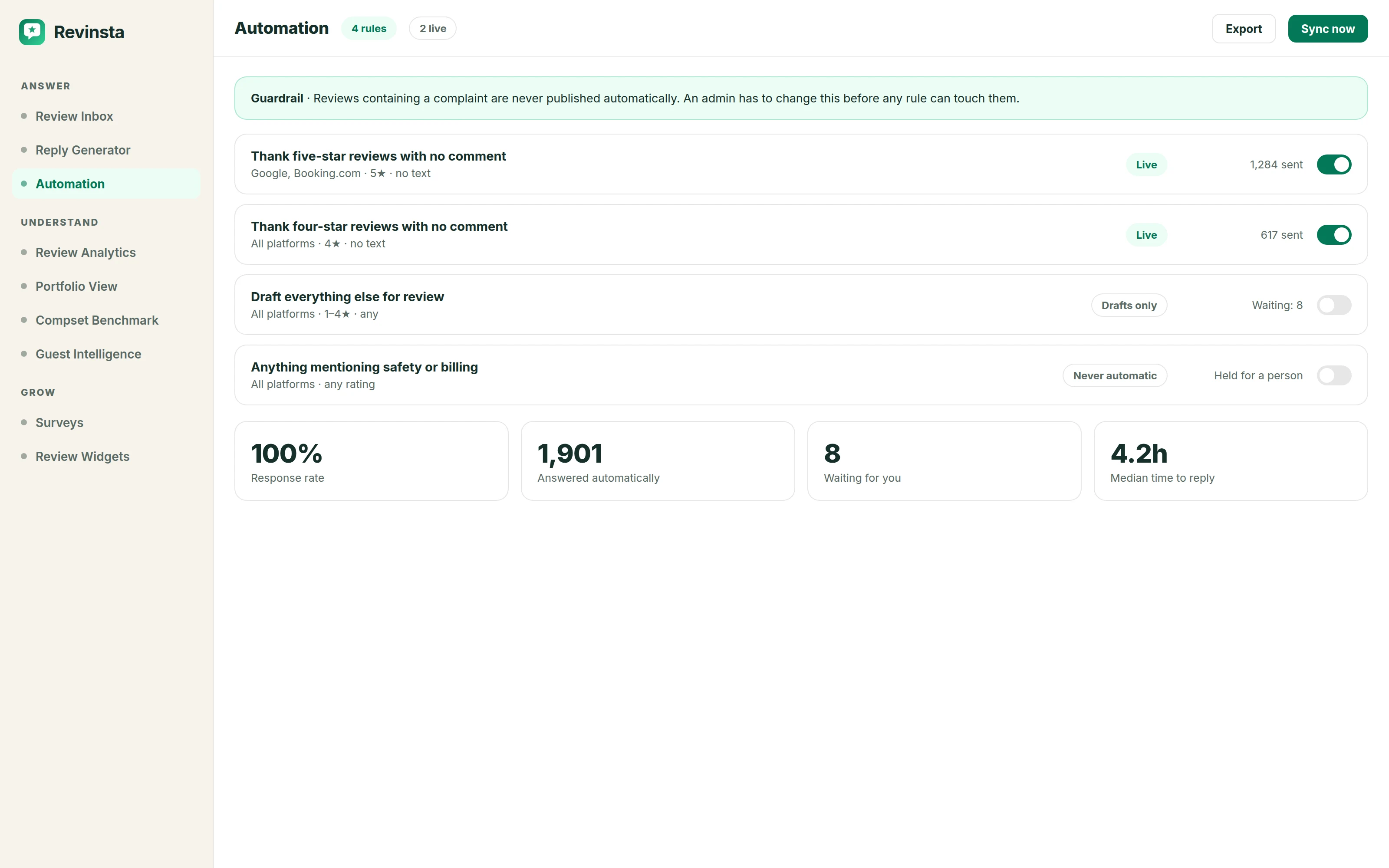
Build rules by platform, rating and timeframe. Auto-reply to easy reviews, or pre-draft everything for a quick human check, with guardrails that keep negative reviews in human hands.
- 7-day free trial
- No credit card
- Set up in about 10 minutes
Look at what is actually in your inbox this week. Most of it is a four-star with no comment, or a five-star that says "lovely stay, thank you." Those still deserve a reply, and replying to them is what eats your Sunday evening.
The reason most hoteliers are wary of automating it isn't the writing. It is the fear of something automatic appearing under their hotel's name beneath a serious complaint. That worry is correct, and any tool that waves it away is selling you something.
So you decide what qualifies - which star ratings, which platforms - and everything else arrives drafted and waits for a person. Reviews with a real complaint in them are excluded by default, and it takes an admin to change that.
How it works
Automation, step by step.
- 1
Write the rule
By platform, by star rating, by whether the review has text, by how old it is. A common first rule: auto-respond to four- and five-star reviews with no written content, on Google only, within 24 hours.
- 2
Pre-draft everything else
Reviews that fall outside the rule are not ignored - they arrive with a draft ready for a human check. Publishing takes one approval, so the queue stays fast even though a person is still in it.
- 3
Guardrails hold the line
Negative reviews stay in human hands by default, and only an admin can widen what automation is allowed to touch. You can turn any of it off at any point, and nothing publishes retroactively.
What you get
Included at every property count.
- Rule: auto-respond to 4-5★ reviews with no text
- Rule: pre-draft for human verification, publish on approval
- Admin guardrails on negative-review automation
Questions
About automation.
Nothing is published without a person approving it unless you switch automation on yourself, and even then it only covers the rules you defined - typically positive reviews with no written complaint. Negative reviews are held back for a human by default and it takes an admin to change that. The rules are yours and you can turn any of them off.
Auto-respond to four- and five-star reviews that have a rating but no text. There is no substance to get wrong, it is usually a third to a half of your volume, and it moves your response rate immediately. Widen from there once you have read a week of output.
Yes. Rules are set per property, so a flagship hotel can stay fully manual while a portfolio of serviced apartments runs automated. Group-level reporting still shows you both.
Google and the major OTAs treat owner responses as an activity signal on your listing, and a traveller comparing two similar properties can see which one answers. Nobody outside those companies can tell you exactly how the algorithm weighs it - what you can control is being the property that replied.
Something we haven’t covered? Ask us directly.
Explore more
All features →Review Inbox
Google, Booking.com, Tripadvisor and OTA reviews land in one two-pane workspace.
Read moreBrand Voice
Your brand voice is how your property speaks to guests.
Read moreSmart Snippets
Describe how to handle recurring topics (expensive parking, no vegan breakfast) and Revinsta weaves the right answer into replies naturally, with different wording every time.
Read moreTry Automation on your own reviews.
Seven days free, everything switched on, no credit card. You’ll know inside ten minutes whether it sounds like your hotel.